New Agents: your own AI workers that run on their own

Lock in. Your tabs do the work.

Tell it what you need. It reads the page, searches the web, clicks, types and fills in forms — and keeps working for you in the background.

Available in the Chrome Web Store ↗ · free plan included

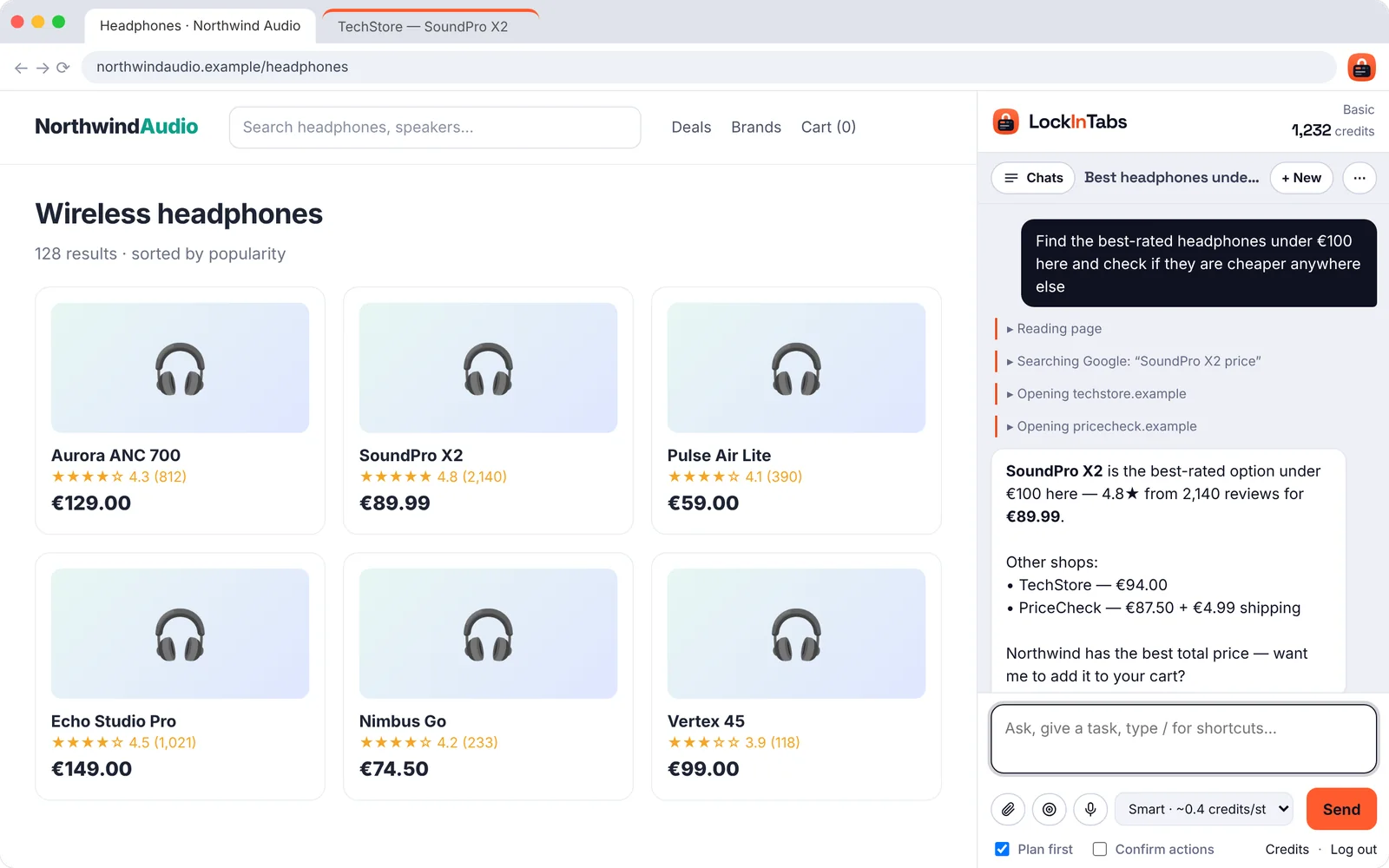
LockInTabs in the browser side panel comparing headphone prices across shops and answering with sources
Real screen: comparing prices across three shops, with sources.Chrome · Edge · Brave
4search engines, one background tab
0passwords typed by the AI — ever
2 minto install and start
Freecredits every month

Made for

Marketing & adsCreate, run and analyze campaignsRead more → Online shopsProducts, orders and customersRead more → Office & adminCRM, invoices and emailRead more → ShoppingCompare, watch and bookRead more → Developers & ITCode reviews, testing and monitoringRead more → Sales & leadsProspect lists, CRM and tendersRead more → Recruiting & HRShortlists and interview invitesRead more → Research & studySources, PDFs and reportsRead more →
How it works in practice

Not another chatbot. An assistant that acts — while you stay in charge.

01

Approve the plan once. It handles the rest.

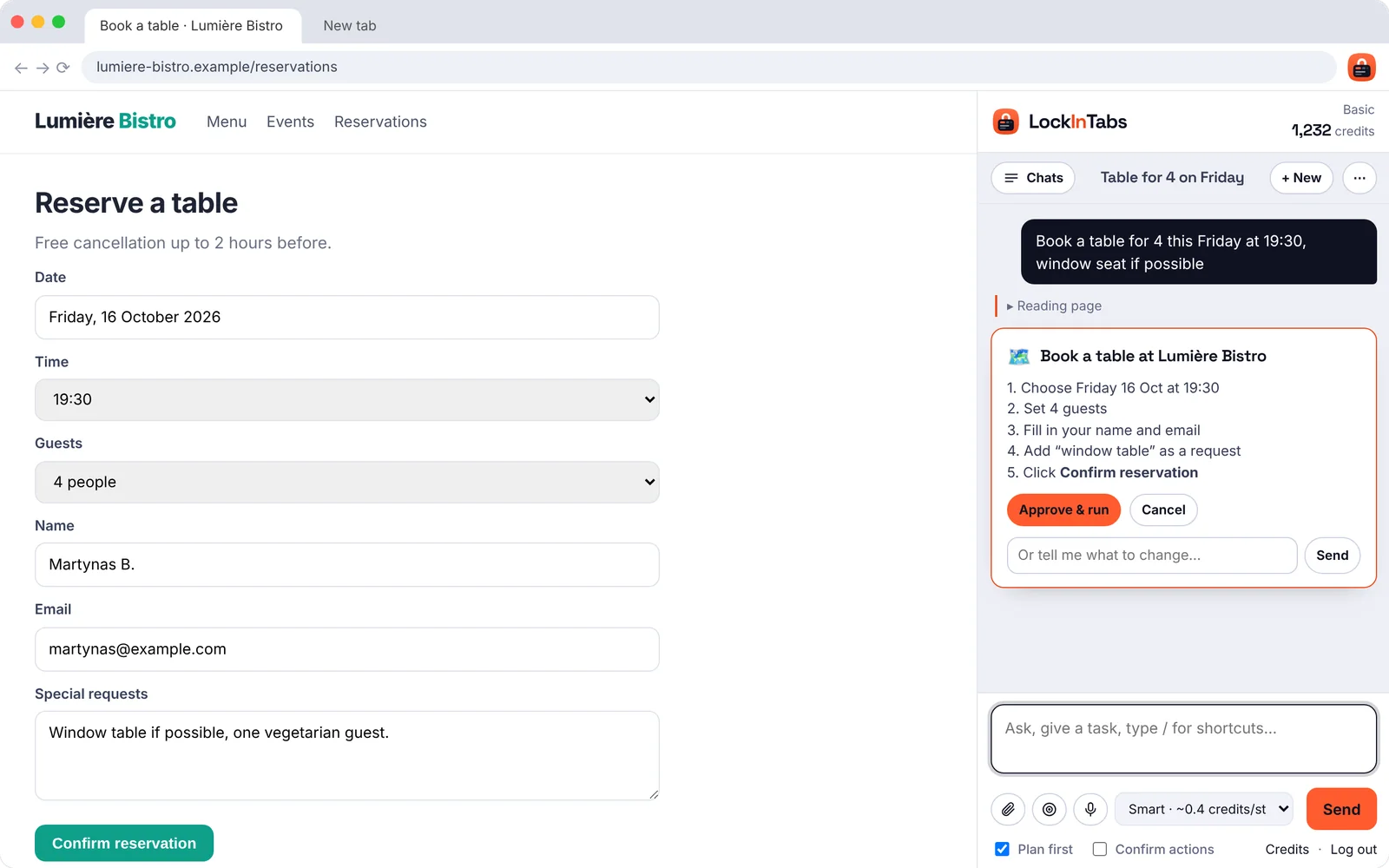
For anything with several steps, the assistant shows its plan first. One click and it fills the forms, picks the options and finishes the job.

  • Clicks, types, scrolls and moves between pages
  • Asks before buying, sending, deleting or submitting
  • Stop it at any moment

“Book a table for four this Friday at 19:30, window seat if possible.”

The assistant shows a five-step plan for booking a restaurant table with an Approve and run button
02

Researches the web and shows its sources.

It searches Google, Bing, DuckDuckGo or Brave, reads the best results in one background tab and answers with links — without cluttering your browser.

  • Reads pages, PDFs and YouTube transcripts
  • Cites every source so you can check it
  • Saves files to your private cloud folder

“Is this cheaper anywhere else?”

Price comparison across three shops with links in the side panel
03

Right-click any text box. Better writing, in place.

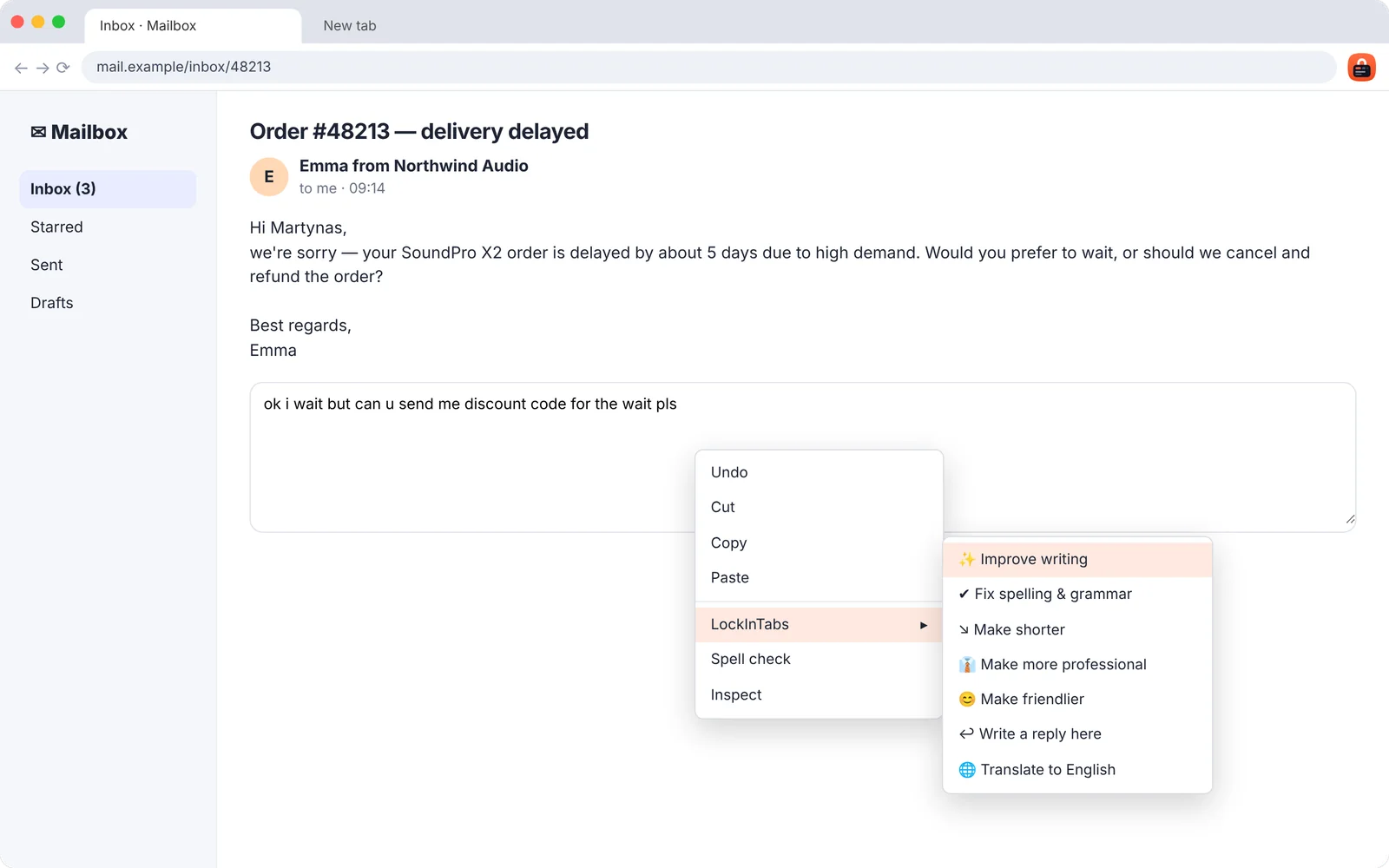
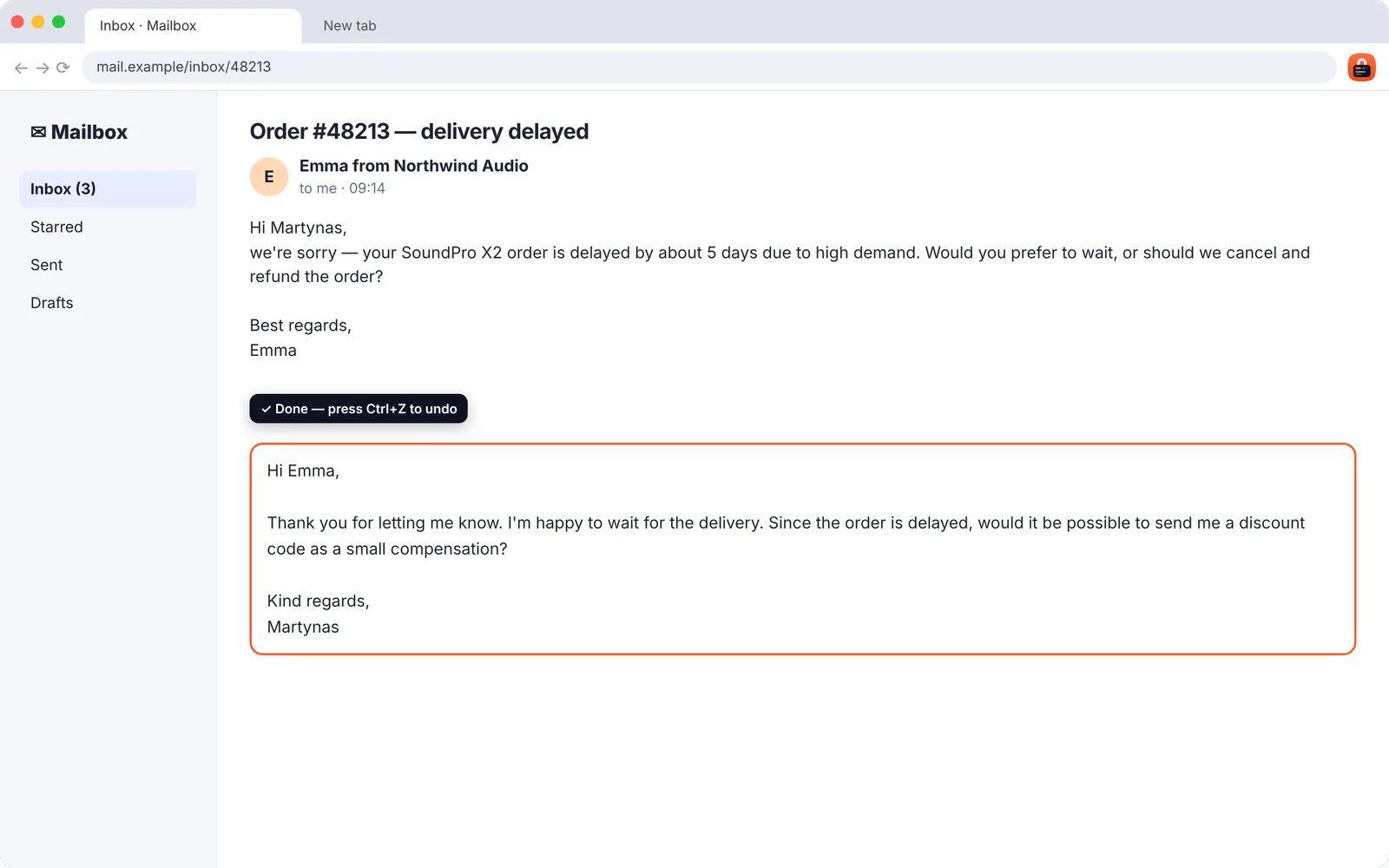
In email, CRMs, support tools or social media: select your text, right-click, and the assistant fixes, improves, translates or writes a reply with the conversation as context.

  • Improve, fix grammar, shorten, formal or friendly
  • “Write a reply here” reads the whole thread
  • Undo anytime with Ctrl+Z
1 — Right-clickRight-click menu in an email with LockInTabs writing options The email reply rewritten politely in place2 — Done
04

Point at it. Get told when it changes.

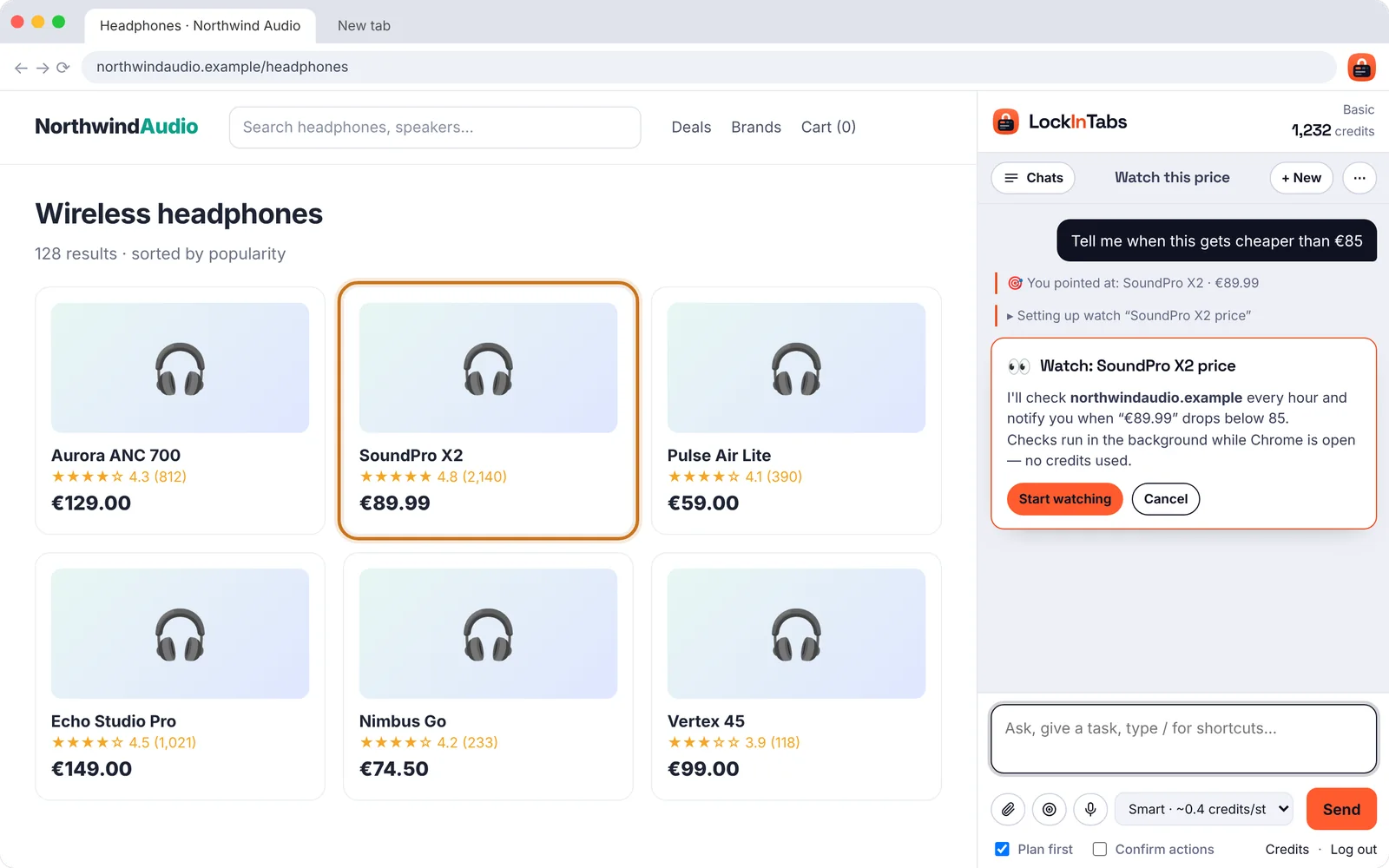
Point at a price, a stock label or any part of a page and ask to be notified when it drops below your target, comes back in stock or changes.

  • Checks run in the background — no credits used
  • Desktop notification the moment it happens
  • Works on any shop or website

“Tell me when this gets cheaper than €85.”

A product price highlighted on the page and a watch being created in the side panel
05

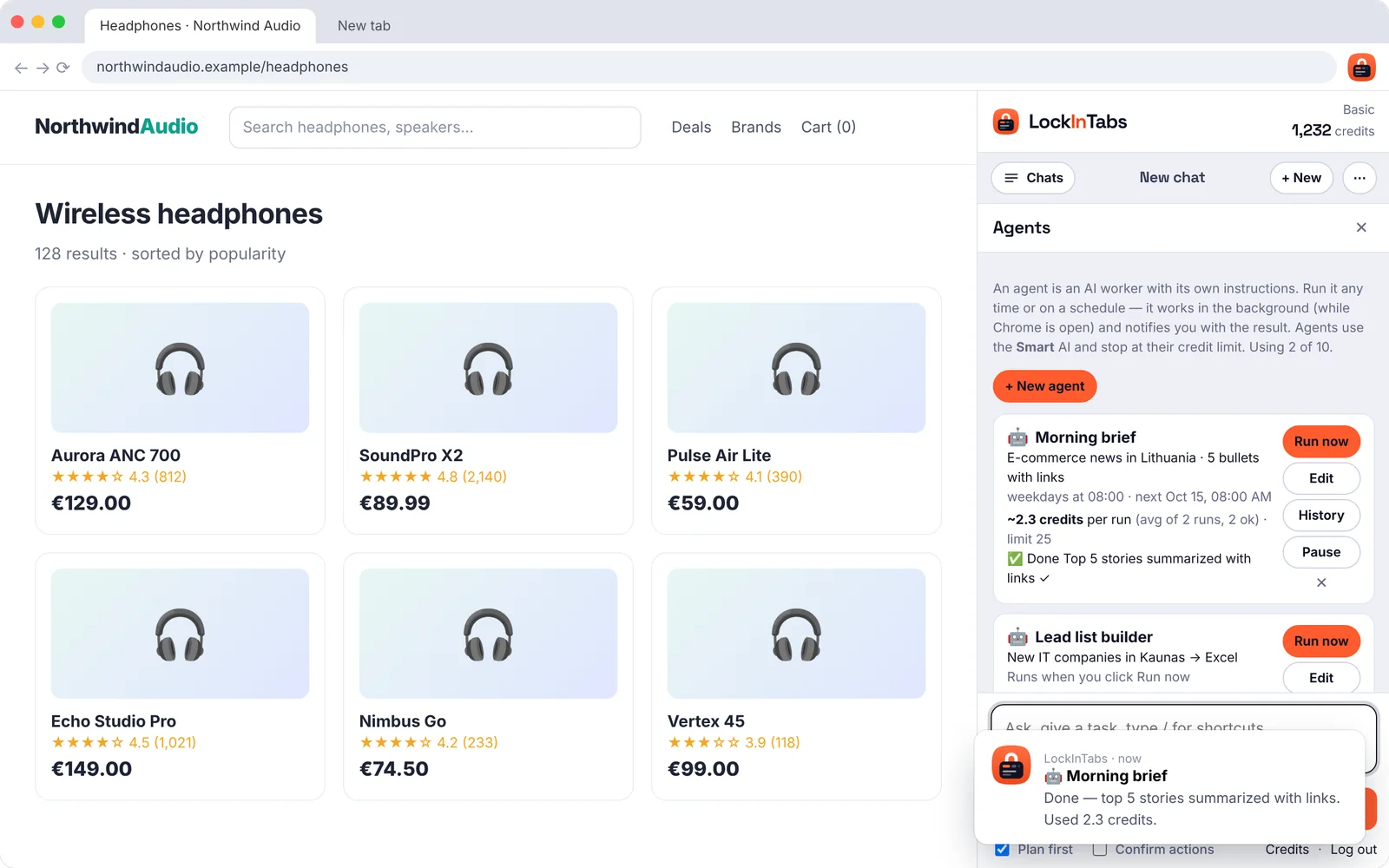
Agents: AI workers that run on their own.

Make an agent for a job you repeat — “collect new IT companies in Kaunas into Excel”, “every weekday at 8:00, brief me on e-commerce news” — and run it with one click or on a schedule. It works in the background and sends you the result.

  • Start from 8 ready templates, or turn any chat into an agent
  • See what each agent really costs per run — a typical run uses 5–20 credits
  • A credit limit per run, so a run can never cost more than you allow
Scheduled tasks and a price watch, with a desktop notification that the price dropped
06

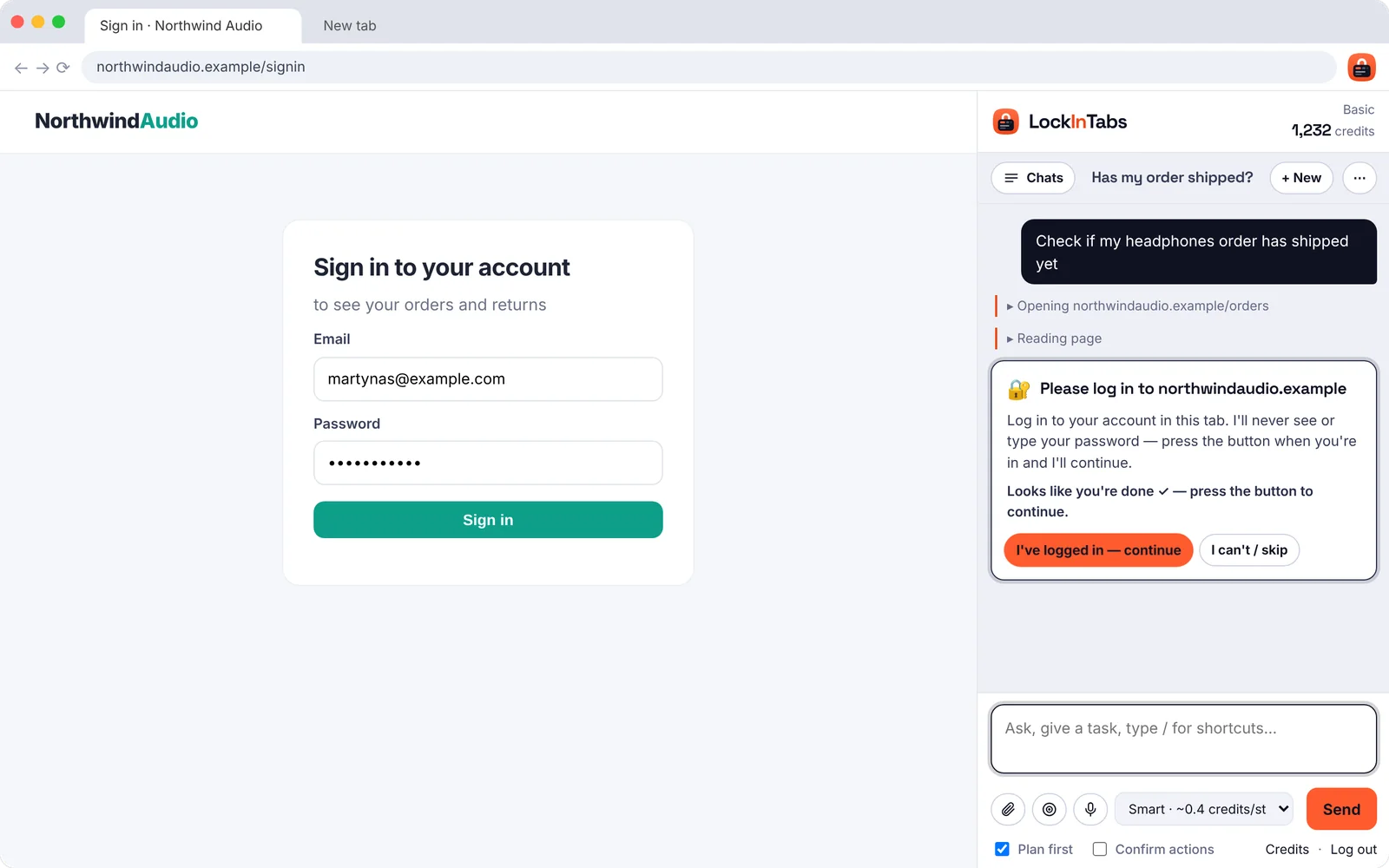
Your logins stay yours.

When a site needs you to log in, enter a code or pay, the assistant hands that step to you, notices when you're done and continues.

  • Password and card fields are blurred in screenshots
  • Secrets in your messages are hidden before the AI sees them
  • Block sites, like your bank, where it may never work
The assistant asks the user to log in themselves and shows a continue button
Small things, big time savings

Built for the way you actually work.

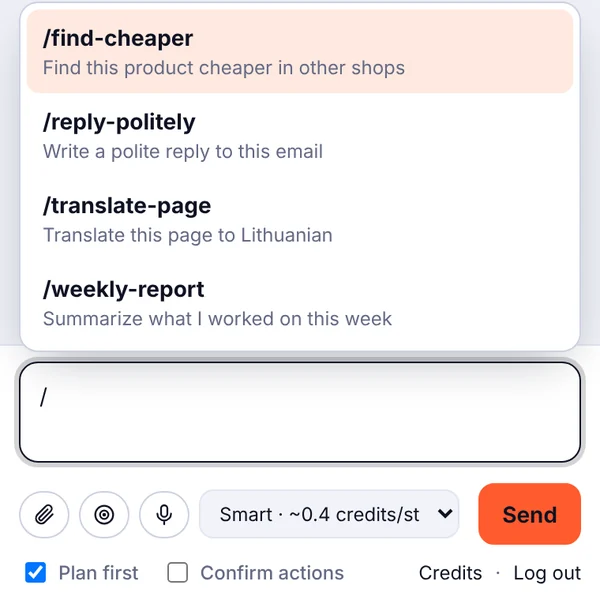
Shortcuts

Save any prompt and run it again by typing /name.

Typing / shows a list of saved shortcuts

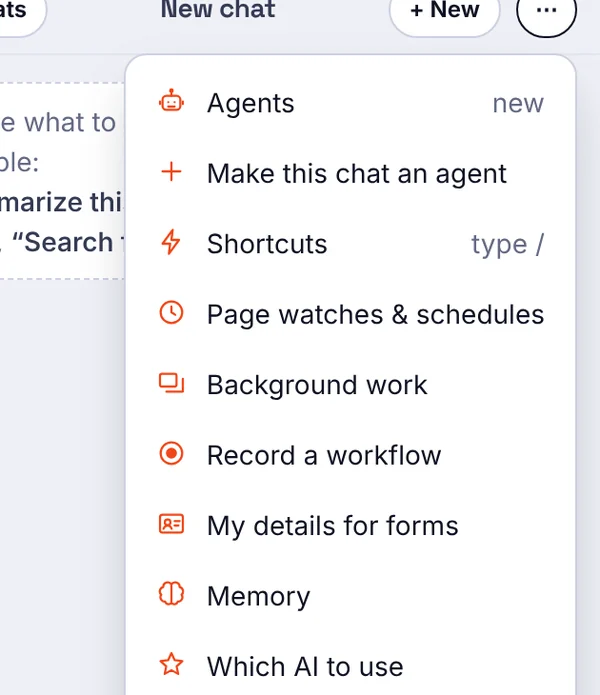
Teach it once

Record a workflow, then let the AI repeat it. Plus memory and blocked sites.

The extension menu with shortcuts, schedules, recording, memory and blocked sites

Show, don't type

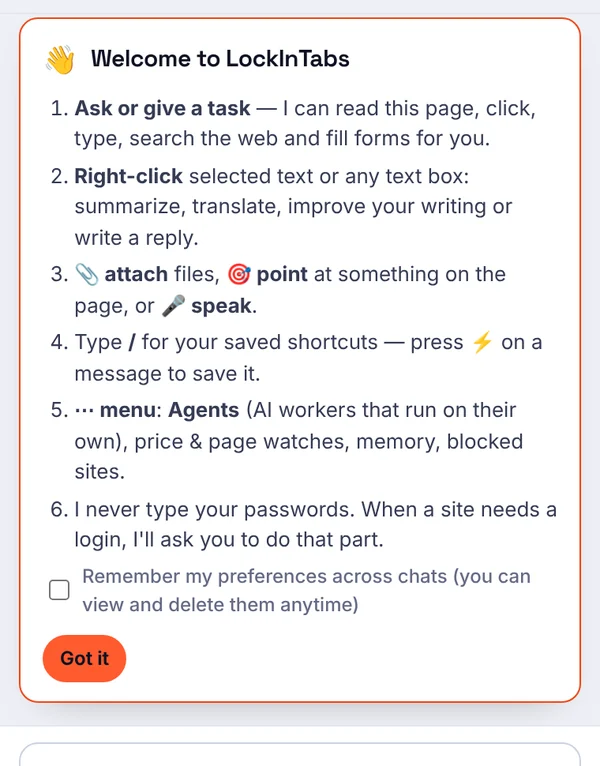
Attach files, point at anything on the page, or just speak.

Welcome tour in the side panel
Everything included

One assistant for your whole browser.

Reads any pageSummaries, facts, prices and contacts in seconds.
Clicks and typesFills forms, filters and navigates until it's done.
Web researchFour search engines, one tab, answers with links.
Plan firstSee the steps before it acts. Approve once.
AgentsSaved AI workers: run now or on a schedule, with a credit limit.
Price and page watchesAlerts for price drops, stock and changes. Free.
Write anywhereRight-click to improve, fix, translate or reply.
YouTube and PDFsSummaries and key moments from videos and documents.
Creates imagesLogos, illustrations and edits of your photos.
Excel, Word and PDF filesTables, reports and offers you download in one click.
Attach and pointImages, PDFs and files — or point at the page.
Voice inputTalk instead of typing, in your language.
Websites to spreadsheetsCollects products, prices and contacts across many pages.
Fills forms with your detailsSave your name, company and VAT code once.
Works in the backgroundKeeps going in its own window and learns where things are.
Choose your AIFaster or smarter, per chat. Pay only for use.
Privacy and security

Your data stays yours.

Built so you can trust an AI with your browser. Your chats, files and credits are private to your account — nobody else, and no other user's AI, can ever see them.

Read the privacy policy
Secrets hidden automaticallyPasswords, API keys and card numbers are removed before anything reaches the AI or is saved.
You do the sensitive partsLogins, two-factor codes and payments are always handed to you.
Blocked sitesChoose sites where the AI may never read or act.
Always in controlPlan approval, optional confirmations and a stop button.
Delete anytimeRemove chats, files and memories, or sign out everywhere.
Hosted in the EUServers in the EU, encrypted in transit.
Getting started

Up and running in two minutes.

Create a free account

Sign up and get free credits every month to try it on your own tasks.

Add the extension

Download it from your dashboard and add it to Chrome, Edge or Brave.

Ask for anything

Click the icon (or press Alt+A), describe your task and watch it work.

Try“Summarize this video with the key moments.”
Try“Fill in this form with my company details.”
Try“Every Monday at 9:00, save my new invoices.”
Try“Tell me when this is back in stock.”
AI options

Pick the right AI for every task.

Switch anytime in the chat. Faster AIs use fewer credits; smarter AIs handle bigger jobs.

A “step” is one action — reading the page, a click or an answer. Most tasks take 2–10 steps.

Pricing

Simple, credit-based pricing.

Every plan includes monthly credits. Need more? Top up with packs that never expire.

Credit packs

FAQ

Questions, answered.

What is a credit?

Credits are how you pay for AI work. Each step the assistant takes uses a few credits, depending on the AI you choose and the size of the page. Your plan adds credits every month, and you can buy extra packs any time.

Which AI does it use?

LockInTabs runs on leading large language models, tuned for working in the browser. You choose the level — Swift, Smart or Ultra — and we take care of the rest. While you type, it suggests the best one for your request.

Is it safe to let an AI use my browser?

The assistant only acts when you ask. It never types passwords or payment details, shows its plan before multi-step tasks, asks before purchases or sending messages, and you can stop it at any moment. You can also block sites where it may never work.

What happens to my data?

Page content you work on is sent securely to our servers and our AI providers only to complete your request. Your chats are saved to your account so you can continue them later, and you can delete them anytime. See our privacy policy.

Do unused credits roll over?

Monthly plan credits refresh on the 1st of each month. Credits you buy in packs never expire.

What are agents and what do they cost?

An agent is a saved AI worker with its own instructions — for example “collect leads from this directory into Excel” or “brief me on the news every morning”. You run it with one click or on a schedule. Agents run on our Smart AI, which scored 99–100% in our tests of real website jobs. A typical run uses 5–20 credits (€0.05–0.20), and every agent has a credit limit per run (40 by default), so it stops before it can cost more. Each agent shows its real average cost per run.

Do agents and watches need my computer on?

Yes — they run inside your browser, so Chrome needs to be open (it can be in the background). If it was closed, a scheduled run happens the next time you open it. Price and page watches are free; agents use credits like normal tasks.

Does the AI remember me between chats?

Only if you turn on Memory. Then it can remember things like your name, language or writing style. You can see, edit and delete everything it remembers at any time.

Can it create images?

Yes. Ask for a logo, illustration or social post — or attach a photo and ask for changes. Images are saved to your private cloud folder.

Which browsers are supported?

Google Chrome, Microsoft Edge, Brave and other Chromium-based browsers on desktop.

Hand over the busywork.

Create a free account and try it on your own tasks today.

Get started free →